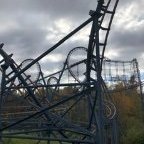
February 15, 201610 yr Hey guys not much to say, but I thought with Banshee entering her third season of operation, I would just post a few photos I took of the ride back in 2013 during construction. Not much else to say. Enjoy! Early construction, before we even knew what it was going to be! Early footers as well. Couple of more showing lift hill completion without loop, taken Haunt 2013. Well I hope you enjoyed that little step back in time. Just a couple of pictures of Banshee's early life. Defiantly loved watching it be built, and certainly love riding it. Can't believe it's already been three years! Thanks for reading, hope you enjoyed! Thanks, hope y'all are staying warm. MaestroJr
February 15, 201610 yr I ran the 5k on opening day in 2013 and remember how neat it was to see that fence and all of those signs, especially knowing the speculation it would ignite once I logged on here!
February 15, 201610 yr Decoding 2014, two KICentral events at the park, Banshee's announcement day, Goble screaming like a Banshee, construction tours, a chilly ride on the log flume... Lots of great memories that year.





Create an account or sign in to comment