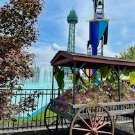
June 7, 201115 yr A couple things I saw yesterday that I haven't noticed before... Some abandoned window... Gray lookout tower...
June 7, 201115 yr Tower is the old tech booth for the old stunt show they used to have in Action Zone
June 8, 201115 yr The first one has certain items that are going on at the park. In October last year, they had a bunch of the Bobble Heads they were giving away on Sundays. I recall there being other stuff there earlier in 2010. The second one I have never seen being used, but the stunt show idea seems to be the most likely to me.
June 8, 201115 yr The second one I have never seen being used, but the stunt show idea seems to be the most likely to me. Not only is the stunt show "idea" the "most likely", it's the truth. A few of us on here remember the Action Zone Stunt Show, and yes, Captain Nemo is correct in saying the tower is the old tech booth for that show.
June 24, 201115 yr A couple things I saw yesterday that I haven't noticed before... Some abandoned window... Gray lookout tower... Just curious, where was the abandoned window at?





Create an account or sign in to comment