




Leaderboard
-
robintodd
Members1Points909Posts -
IndyGuy4KI
Admin1Points10,639Posts -
KI FANATIC 37
Members1Points3,108Posts -

BB1
Members1Points5,261Posts



Popular Content
Showing content with the highest reputation on 08/23/2026 in all areas
-
Festhaus has new menu screens (not tvs, but the design/artwork on them), they look great, French Quarter does also. Not sure if all of them have been done throughout the park but the look much better than before.1 point
-
IMO I feel like I got my value out of my pass this year. The first part of the season I had a very light attendance schedule as I was testing for certifications for work (the 9/10 aka a management cert for the financial industry) BUT I feel like I did get to use my pass at Cedar Point quite a bit in July, my free snacks and exclusive VIP parking enough to warrant the pass. Now I’m planning on heading out west to LA this October and I believe Knotts will be doable on that trip. I believe at this point I have the cash so im just going to buy my pass outright and all of the works for 2027.1 point
-
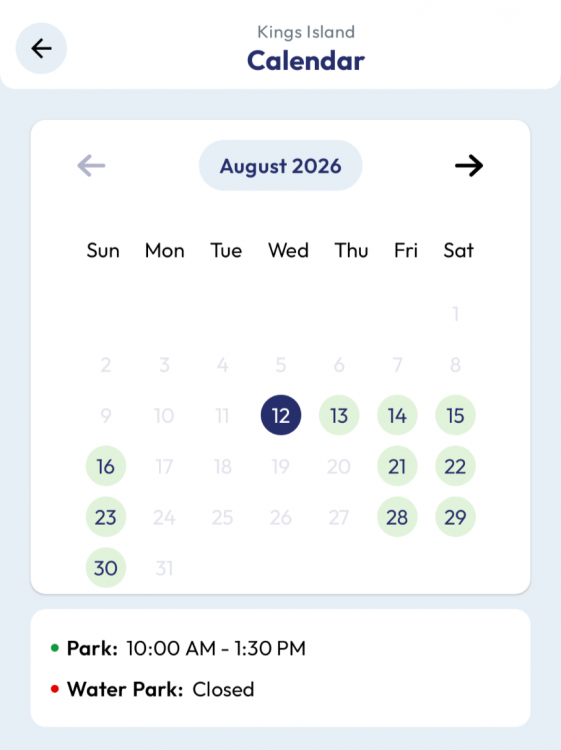
Was almost going to travel up from Lexington today to go hoping for storm breaks and light crowds, but looking at weather this AM I decided against it. I dont judge the park for closing, I judge them for lack of announcement. Have only been once this year. Not feeling strong to return any time soon1 point
-
Don't worry, guys, they updated the app! That ought to take care of it, right?
 1 point
This leaderboard is set to New York/GMT-04:00