




Leaderboard
-
DonHelbig
Members4Points1,024Posts -
disco2000
Members2Points4,747Posts -
.png.d6d23ff1c3467b81a02dd2f7ecefcb39.png)
Hawaiian Coasters 325
Members2Points4,288Posts -
CedarPointer
Members1Points5,519Posts



Popular Content
Showing content with the highest reputation on 03/02/2026 in all areas
-
Biggest and largest doesn’t move the needle. Experiences that are worth repeating do.4 points
-
I'm just hoping that the "immediate boarding" version either isn't available as an all-season product next year or is significantly more expensive. It is pretty funny, though, seeing the sour grapes about this change from the "well, it SAID subject to change when you bought it!" crowd.1 point
-
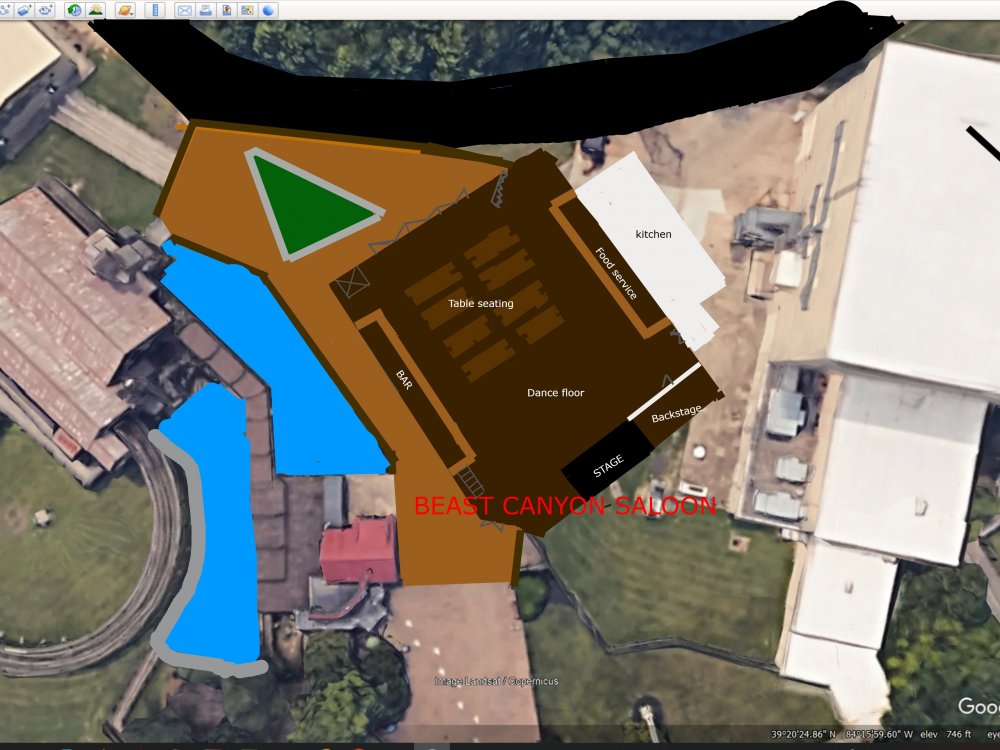
1 pointI came up with an idea to expand and refresh The Beast plaza as well as add a new indoor restaurant/show venue. The new restaurant/show venue I'm calling Beast Canyon Saloon would feature 2 levels, a bar, as well as a stage which would be a permanent home for country shows. It would also house a dance floor and during the day in between show times would offer free line dancing lessons (like those places in Nashville) which would be a cool experience for guests. I also added a water feature back to The Beast's queue area. Also while not in the concept, I envision The Crypt/current Conjuring building would be used for another indoor attraction
 1 point
 -
And that is exactly why KI puts in and does what they do.... People are going to come regardless based on proximity and cost.1 point
-
Can't wait to see how many have their phone out on the ride or the brake run scheduling their next ride....1 point
-
Here's to the last full month of the park being closed!1 point
This leaderboard is set to New York/GMT-04:00