




CedarPointer
Members
-
Joined
-
Last visited
Everything posted by CedarPointer
-
You would think even the world's most clueless leadership would realize that people will be a LOT more upset about being scammed for $600. Their wording doesn't leave them nearly as much room to change the rules on people as, say, when they acted like people were unreasonable for being upset when their definition of what "Halloween Haunt" is suddenly changed because they wanted to make a quick buck.
-
How typical of them to change the rules on people with zero warning once again. Guess Reddit was right about the near accident last weekend!
-
I mean, yeah, two hypers in a park doesn't make sense either, especially when the newer of the two isn't as good.
-
Perfect choice, a park that already has an RMC! How stupid is this company?
-
Either that or they simply didn't get wind of it. Nobody would have known about the near-accident on Millennium Force if it weren't for a Facebook post. The ride suddenly going down around the time it was reported this happened is easily verifiable, and there's a photo of maintenance seemingly testing out the seat with the issue. It seems kind of telling that, not long after that was posted, the ride suddenly closed for the rest of the weekend. It's hard to give a company with a poor safety record recently and a history of covering up accidents the benefit of the doubt, unfortunately.
-
According to Reddit, there was some sort of incident on The Beast with a guest exiting the train after their restraint failed on the lift. https://www.reddit.com/r/KingsIsland/comments/1xev7dx/_/
-
Sending a email to passholders addressing the company's recent killing spree is one of the most desperate things I've ever seen them do.
-
Food for thought for anyone celebrating this change: https://attractionsmagazine.com/carowinds-winterfest-2025-six-flags/
-
The near-accident on Millennium Force has now been confirmed. https://fox8.com/news/roller-coaster-shut-down-at-cedar-point-after-part-dislodged-from-ride/
-
Are we talking about the seatbelts that ride ops routinely tell guests are fine if they're loose? "If it's not tight, it's alright!"
-
Cost cutting kills.
-
And of course, you have the same people making the same excuses about employees being in school, etc, none of which is the customer's problem.
-
Careful, based on the arguments people keep making, they'd improve the show selection but you'd have to buy a Haunted Shows Pass to watch them, because they apparently can't invest in the park anymore without it being tied to a cash grab.
-
Unfortunately, the "Ready to Use" in the app does not actually indicate that your dining plan is Ready to Use.
-
Maybe the first day the park has been open to the public in weeks wasn't a great time to start using SLOW mobile devices to scan people's passes. Just a thought!
-
One would hope it actually means your meal is ready and not just that you have a dining plan, because obviously you have one if it's showing there. Otherwise, they're going to have a lot of guests arguing with cashiers telling them it's not time for another meal yet, since the app explicitly says it's ready to use.
-
At least you can rest assured that, if you're given incorrect information, you'll be told it was "subject to change" anyway.
-
Unfortunately, at least some of them, like Grain and Grill and Snoopy Grill, have extremely unappetizing AI slop images of the "food".
-
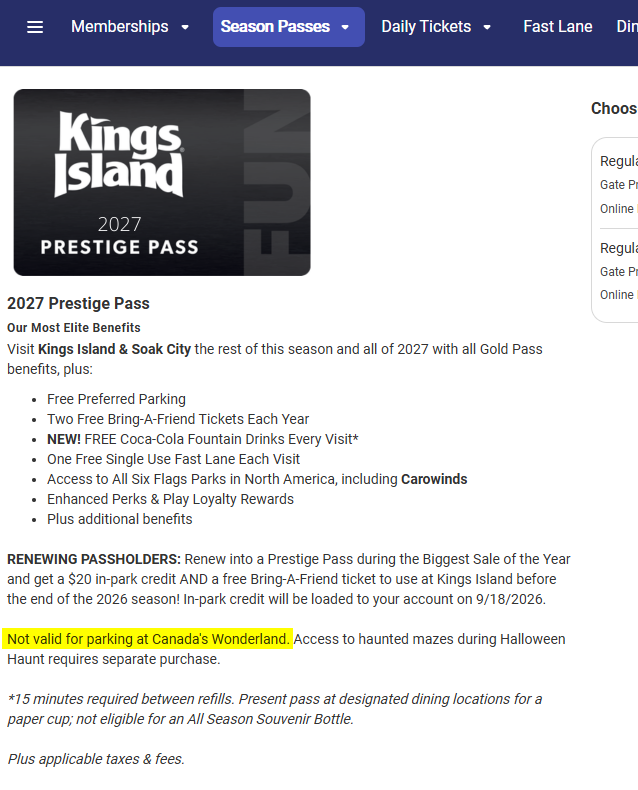
They desperately need to start getting things figured out before they start asking people for their money. For example, when you click View Details on the prestige pass on https://www.sixflags.com/kingsisland/season-passes: But then as soon as you click on Buy Now: How hard is it to be consistent? I guess it doesn't matter when they constantly change the rules on people at the drop of a hat anyway.


-
Pretty sure accuracy just isn't a priority for their social media team. For example, a post implying that the park is open Monday (which, surprisingly, was fixed eventually):

-
They don't want any additional attention brought on how often they close early these days. Same reason they'll spam you with irrelevant notifications for upsells with their app but won't send out any sort of notification there either (even if they can tell you're in the park).
-
Unfortunately, I did forget to bring a newspaper to prove the pictures were taken today.


-
It's not supposed to, but I've already seen complaints that the cashier is able to ring them up on the "wrong" dining plan and use one of their 20 or 30 meals instead of their 2026 dining plan.
-
The ice issue will be even worse since they're effectively forcing prestige passholders to buy a drink plan.
-
I think the problem is that there's no indication that there will be any actual improvements to the guest experience next year to go along with the increased prices. Even just publishing an operating calendar, committing to continuing Winterfest, and publishing a menu for their $400 dining plan would go a long way, but I don't think it's surprising that people aren't happy about a place that's gone downhill so much over the last few years demanding more money from them. The slight increase in pass prices isn't going to help with the crowding or clientele issues, and the ruining of the dining plan just makes me think there will be even more reduced staffing and reduced availability for food next year.